Chromateq

CLUB 512+

IMPROVED & AFFORDABLE USB-DMX DEVICE

CLUB 512+, the compact DMX interface designed for DJ’s or professional installations

The CLUB 512+ is an enhanced evolution of our well‑known CLUB 512, created for all DMX lighting performance, DJ’s and integrators who need a reliable, modern, and easy‑to‑deploy DMX controller. This new version includes RDM, a wide‑range 9–24 V terminal‑block power input, 64 Mb of  memory, an infrared port and safer dry contacts, ensuring fast triggering and great usage in fixed installations.

Designed for maximum flexibility, the CLUB 512+ is available in two hardware versions: XLR or TB (Terminal Block), allowing seamless integration into touring setups, clubs or events and permanent installations. It also features an infrared receiver with an IR remote, offering quick access to scenes and essential standalone functions without a computer.

Compact, robust, and fully compatible with all Chromateq software, the CLUB 512+ delivers a professional solution to control scenes, sequences, and DMX installations with outstanding stability, whether in USB live mode or standalone mode.

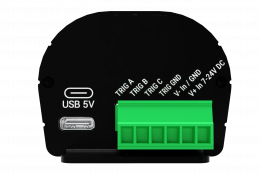
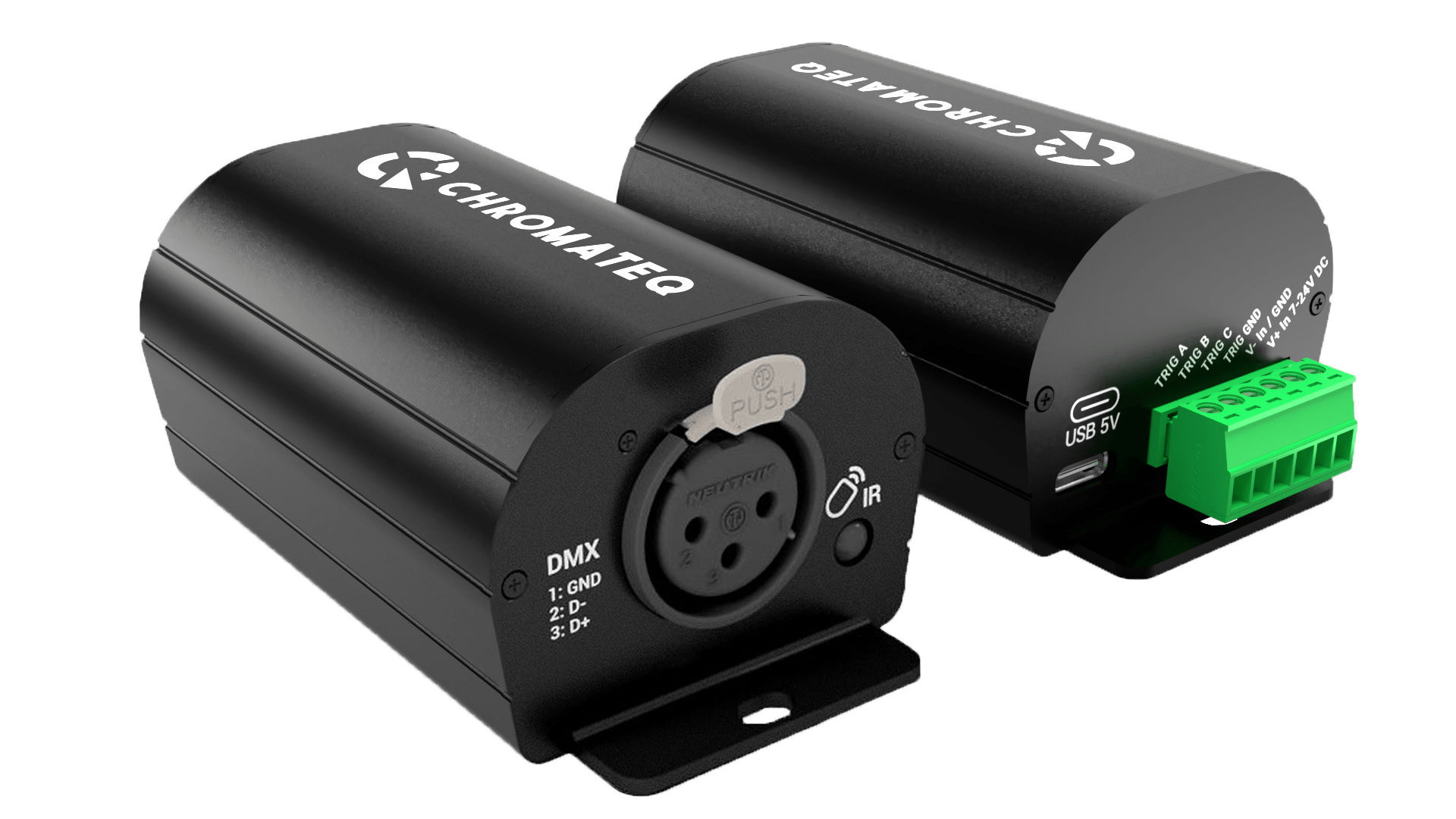
CLUB 512+ - USB-C side
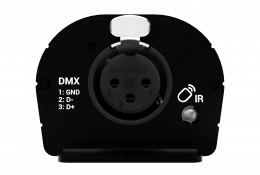
CLUB 512+ - XLR DMX side
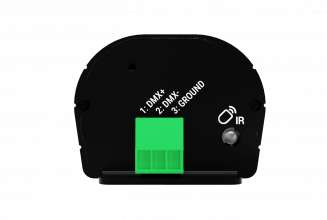
CLUB 512+ - TB DMX side
Face-trig

USB-C
5V. DC, 0.1A

Terminal Block
1. TRIG A
2. TRIG B
3. TRIG C
4. TRIG GND
5. V- In / GND
6. V+ In 7-24V DC

Face-XLR

XLR
1. Ground
2. Data -
3. Data +

Infrared Receiver LED Remote unit is optional

Face-TB2

Terminal Bloc
1. DMX +
2. DMX -
3. GROUND

Infrared Receiver LED Remote unit is optional

DMX-RDM Outputs

Control up to 512 DMX channels perdevice.
DMX-RDM compatible for bidirectional communication with professional lighting equipment and DMX addressing.

Stand-Alone & Triggers

64Mb internal memory to save and play back shows without a computer.
Triggers: 3 Smart dry Contacts (on Ground)
Infrared IR remote unit included.

Tiny PCB & Power input

Powered via USB 5 V or 9–24 V DC Input, compatible with all DC sources.
Ultra‑compact design for small place requirement integrations and installations.
High‑voltage protection: 3 kV (DMX)and 1.5 kV (power input).

Attractive Price

Our entry-level controller is ideal for tight budget and small projects, lighting test and promotion packages.

XLR or TB versions

Two versions of output connector available for all types of lighting projects or installations.

International Warranty

3‑year international warranty.
Worldwide technical support.

Discover and compare Chromateq devices.

Compatible Software

Lighting control software

Our new DMX controller – CLUB 512+ can be integrated into scalable control systems designed for live performances or fixed installations, or deployed individually without a computer as an elegantly simple but sophisticated standalone control solution.

PRO DMX 2

LED PLAYER

PRO DMX

STUDIO DMX

All our Lighting Management Software are Free and require a Chromateq™ Device or Interface to transform your computer into an impressively adaptable and effective DMX Controller.

Infrared Remote

Module Infrared 25
Module Infrared 01
Module Infrared 02
Module Infrared 03
Module Infrared 04
Module Infrared 05
Module Infrared 06
Module Infrared 07
Module Infrared 08
Module Infrared 09
Module Infrared 10
Module Infrared 11
Module Infrared 12
Module Infrared 13
Module Infrared 14
Module Infrared 15
Module Infrared 16
Module Infrared 17
Module Infrared 18
Module Infrared 19
Module Infrared 20
Module Infrared 21
Module Infrared 22
Module Infrared 23
Module Infrared 24

Infrared Remote Unit

Each button play or stop a scene.
Buttons 1 to 15 must be assigned to a scene number via the software before upload your project in memory.

—–
Buttons 1 to 15 are available with single zone project.
Buttons 1 to 9 are available with multiple zone projects.
Select the mode speed, dimmer and use + and – buttons.

Number 2

Each button triggers a different scene. Buttons 1 to 15 must be assigned to a scene via the software.
—–
Trigger 1 to 15 with 1 Zone.
Trigger 1 to 9 with several Zones
Buttons 1 to 15 must be assigned to a scene via the software.

Number 3

Each button triggers a different scene. Buttons 1 to 15 must be assigned to a scene via the software.
—–
Trigger 1 to 15 with 1 Zone.
Trigger 1 to 9 with several Zones
Buttons 1 to 15 must be assigned to a scene via the software.

Number 4

Each button triggers a different scene. Buttons 1 to 15 must be assigned to a scene via the software.
—–
Trigger 1 to 15 with 1 Zone.
Trigger 1 to 9 with several Zones
Buttons 1 to 15 must be assigned to a scene via the software.

Number 5

Each button triggers a different scene. Buttons 1 to 15 must be assigned to a scene via the software.
—–
Trigger 1 to 15 with 1 Zone.
Trigger 1 to 9 with several Zones
Buttons 1 to 15 must be assigned to a scene via the software.

Number 6

Each button triggers a different scene. Buttons 1 to 15 must be assigned to a scene via the software.
—–
Trigger 1 to 15 with 1 Zone.
Trigger 1 to 9 with several Zones
Buttons 1 to 15 must be assigned to a scene via the software.

Number 7

Each button triggers a different scene. Buttons 1 to 15 must be assigned to a scene via the software.
—–
Trigger 1 to 15 with 1 Zone.
Trigger 1 to 9 with several Zones
Buttons 1 to 15 must be assigned to a scene via the software.

Number 8

Each button triggers a different scene. Buttons 1 to 15 must be assigned to a scene via the software.
—–
Trigger 1 to 15 with 1 Zone.
Trigger 1 to 9 with several Zones
Buttons 1 to 15 must be assigned to a scene via the software.

Number 9

Each button triggers a different scene. Buttons 1 to 15 must be assigned to a scene via the software.
—–
Trigger 1 to 15 with 1 Zone.
Trigger 1 to 9 with several Zones
Buttons 1 to 15 must be assigned to a scene via the software.

Zone A | 10

With 2 Zones and +, select a zone to control. 5 Zones available: A, B, C, D, E and Global Zone: [ ] to trigger each Zone together.

Zone B | 11

With 2 Zones and +, select a zone to control. 5 Zones available: A, B, C, D, E and Global Zone: [ ] to trigger each Zone together.

Zone C | 12

With 2 Zones and +, select a zone to control. 5 Zones available: A, B, C, D, E and Global Zone: [ ] to trigger each Zone together.

Zone D | 13

With 2 Zones and +, select a zone to control. 5 Zones available: A, B, C, D, E and Global Zone: [ ] to trigger each Zone together.

Zone E | 14

With 2 Zones and +, select a zone to control. 5 Zones available: A, B, C, D, E and Global Zone: [ ] to trigger each Zone together.

Global | 15

With 2 Zones and +, select a zone to control. 5 Zones available: A, B, C, D, E and Global Zone: [ ] to trigger each Zone together.

Increase | 16

Selects next or previous scenes
—–
Increase or decrease the value of the
selected mode:
– Scene +/-
– Dimmer +/-
– Speed +/-
– Color +/-

Pause | 17

Freezes the current scene in its state

Blackout | 18

Stops the current scene and plays the scene 00. All DMX levels are set to zero.

Decrease | 19

Selects next or previous scenes
—–
Increase or decrease the value of the
selected mode:
– Scene +/-
– Dimmer +/-
– Speed +/-
– Color +/-

Speed Mode | 20

Select Speed mode
—–
Increase Speed value

Dimmer | 21

Select Dimmer mode
—–
Increase Dimmer value

Release color mode | 22

Color Mode | 23

Select Color mode
—–
Decrease Speed value

Scene Mode | 24

Select Scenes mode
—–
Decrease Dimmer value
Main Features

Hardware & DMX (Software & Live)

CLUB 512+

Retail Price (excluding VAT)

€229 / $259

DMX with PRO DMX 2, PIXXEM

512 (In/Out) per device, RDM​

RDM (dual DMX data directions, DMX addressing)​​

Yes

Upgradable on site

Yes, UxU (add Art-Net Universes)

USB-C compliant

Yes (5V. DC, 0.1A)

Max Connected devices

12 by USB = 12 DMX max

International Warranty

3 Years

Dimensions (mm / in)

H : 103 (4.06 po) / L : 50 mm (1.96 po) / P : 37,5 mm (1.47 po)

Weight / Operating Temperature / Certification

0.09 Kg (0.19 lb) / -40 to +85 C° / CE, RoHS

Stand Alone

DMX Out (16-bit channels)

512 out

Zone (Scene play a time)

1

Memory Step capacity

64 Mb, 20000 steps for 1 U.

Max scene capacity

512

Power input

9-24V. DC, 5V. USB, 0.2A, 0.7W

Triggers (Stand Alone)

Smart Contacts (on, on/off, release, commands)

3 pins (Trigger on Ground)

Infrared remote (play/stop/pause, dimmer, speed)

Included

Software Options

Software

CLUB 512+

PRO DMX 2, IXXEM, STUDIO DMX

512 (In/Out) per device

Audio Timeline

Optional (need FULL* Upgrade)

Wi-Light - Mobile APP / API

Software control only from a mobile and LAN

Worldwide Technical Support​

Yes, English, French, Chinese​​

*FULL: +RDM + 24hTimeline + Multi timeline + Timeline Live record + 3D unlimited + MIDI Time Clock + SMPTE + PC Calendar & Clock Triggers.

Art-Net, sACN, DVI, DMX in/Out

ART-NET, sACN Output (PRO DMX 2 / PIXXEM)

Optional (max 64U / 512U)

DMX Input, control and Record

512 + RDM

ART-NET, sACN Input, control, triggers, record

Optional (max 16U)

DVI supported resolution (PIXXEM)

Optional (max 1920*1080)

Triggers

MIDI, RS232, Wi-Light, UDP, Keyboard, Hyperlinks

Yes

MIDI Control, Audio BEAT, BPM, Wi-Light, UDP

Yes

User Interface customization

Yes

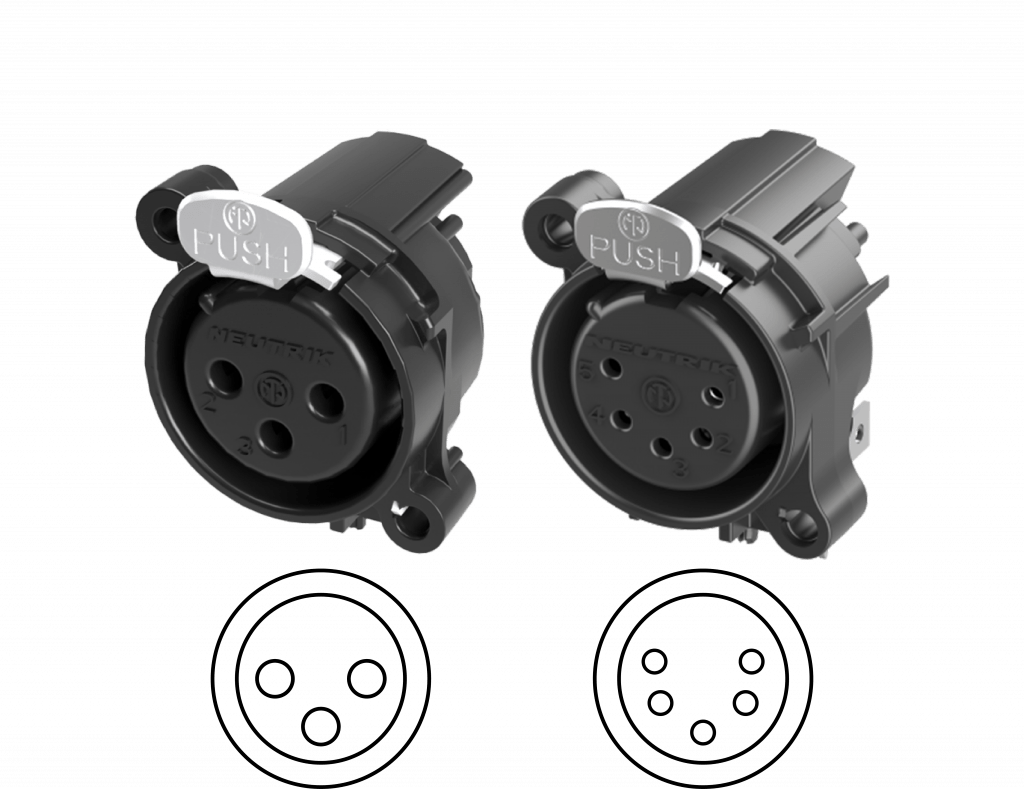
3 and 5 Pin XLR available 

All our XLR devices are equipped with a 3‑pin XLR connector, on demand, each device can be supplied with a 5‑pin XLR connector, upon request when ordering. Get your device with 5 Pins XLR will extend the delivery time by 2 to 5 days. XLR 5 Pins need to be be indicated in the proforma.

Universal DIN Rail Mounting

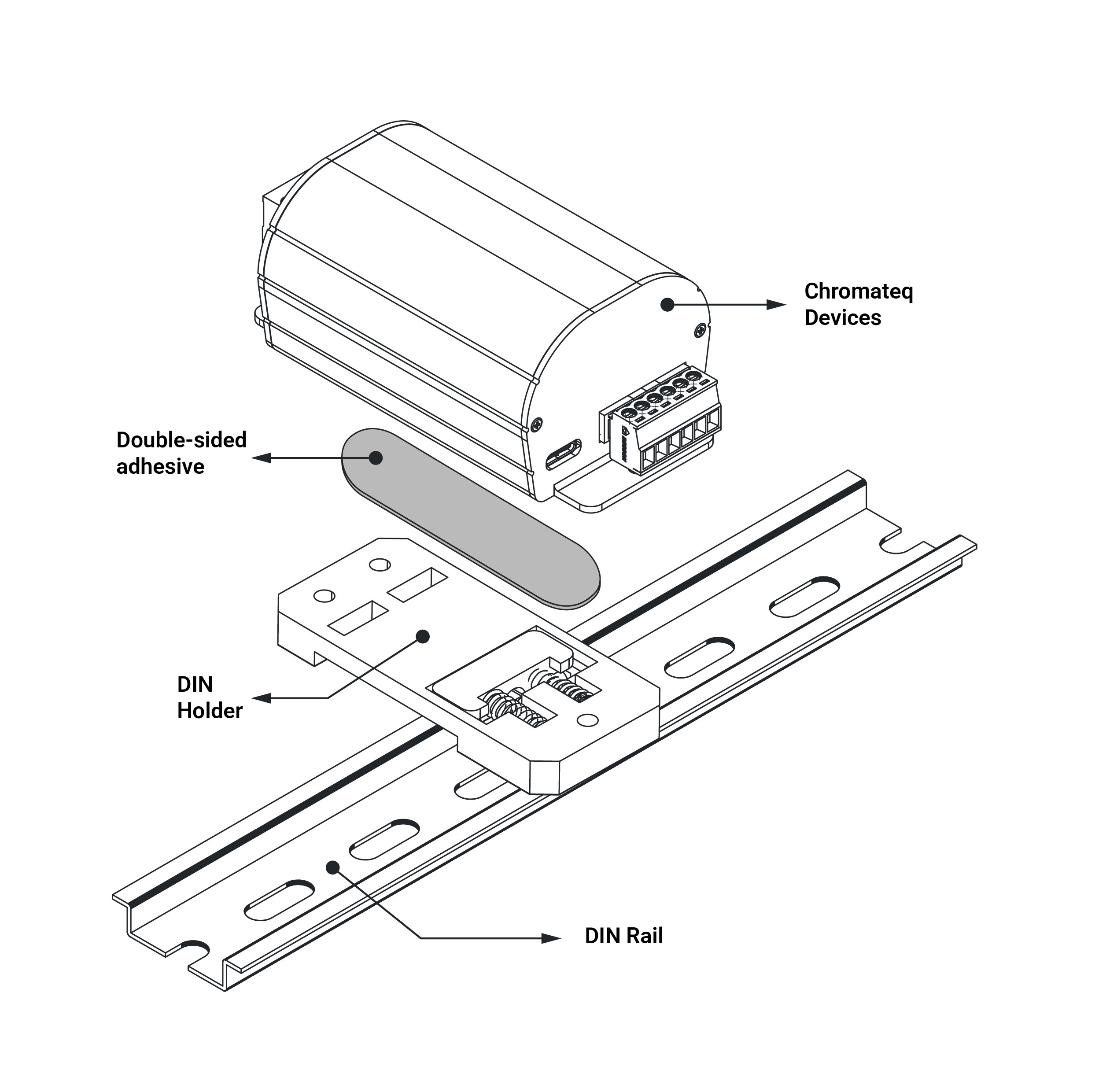
The DIN Rail Holder is an easy and convenient mounting solution designed to easily attach any Chromateq devices to a standard DIN rail. Engineered for integrators, installers, and technical environments, it ensures a clean, secure, and reliable installation inside electrical cabinets, control panels, and industrial systems.

It is fully compatible with all Chromateq products, providing fast and seamless integration for projects requiring DIN rail mounting. The DIN holder is attached to the back of the case using a strong, sturdy double-sided adhesive (3M).

Available upon request when placing your order. Price is 20€ (excluding VAT).

Support and Download

Datasheet - Product Manual

CLUB 512+’s complete technical documentation (Data-sheet)

Product Brochure

CLUB 512+’s description, main features and specifications

Quick Start Guide

Quick explanation of the CLUB’s features. Quick start guide with mounting, safety instructions and pinout.
Available languages: en, fr, cn

Product Pictures & Videos

High-resolution CLUB 512+ Chromateq product images and videos for commercial use, promotion and marketing

Device Comparison Chart

Table comparing Chromateq interface features by model

General Brochure

All Chromateq software and devices, with their features in a single document.

Documentation

All available commercial files (Brochure, Flyer, Certificate of conformity, poster, wiring schematic by Language EN, FR, CN)

Device Data-Sheet

All interface datasheets and complete technical documentation by language (EN,FR, CN)