Chromateq

CLUB SPI

USB TO SPI AND DMX

The mix of SPI and DMX controllers in both Live and Standalone

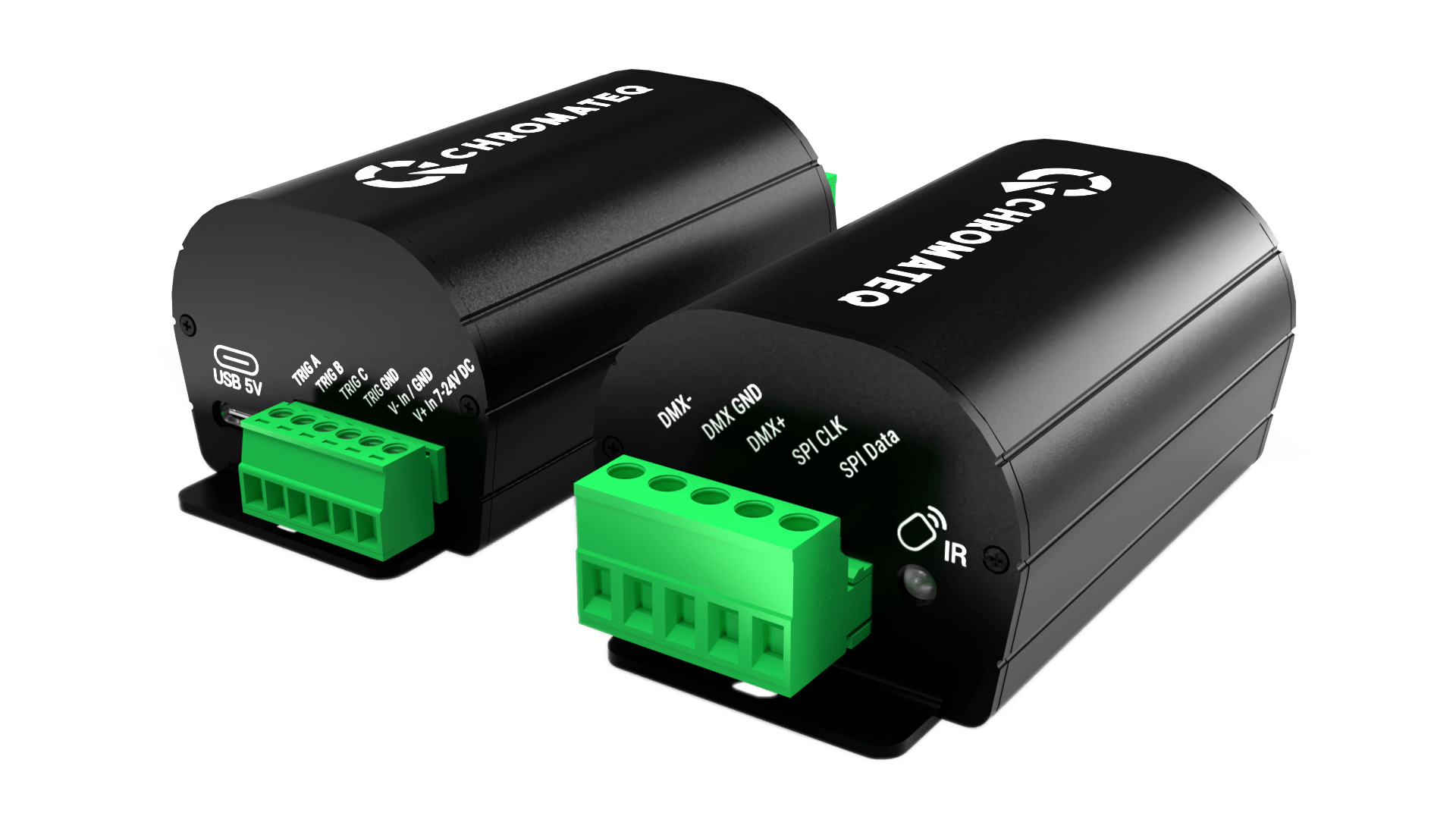
Chromateq’s latest innovative USB-to-SPI stand-alone interface features both SPI and DMX512 ports. Thanks to its tiny and compact size, minimal integration space requirements, and SPI LED and DMX communications. The CLUB SPI is the ideal LED controller or LED driver for all types of LED lighting installations and LED Strip projects.

The CLUB SPI converts data from the software directly to SPI format up to 1020 RGB or 768 RGBW pixels at 25-30 fps. Everything is integrated into a single device to output SPI directly, canceling the need for a DMX controller paired with an additional DMX to SPI driver.

The device benefits from Chromateq’s popular and powerful stand-alone features. It can easily record a show to its internal memory and play it back without requiring a computer.

The interface offers multiple trigger options, including DMX input, Smart Dry Contacts, and infrared remote control. It can be seamlessly integrated into any lighting system, making it an essential tool for all LED projects.

The CLUB SPI is very versatile because it can also be used as a standard DMX to SPI driver of 512 DMX channels input to 170 RGB or 128 RGBW pixels with a smaller integration space than standard LED drivers and the 1 to 6 pixels grouping option.

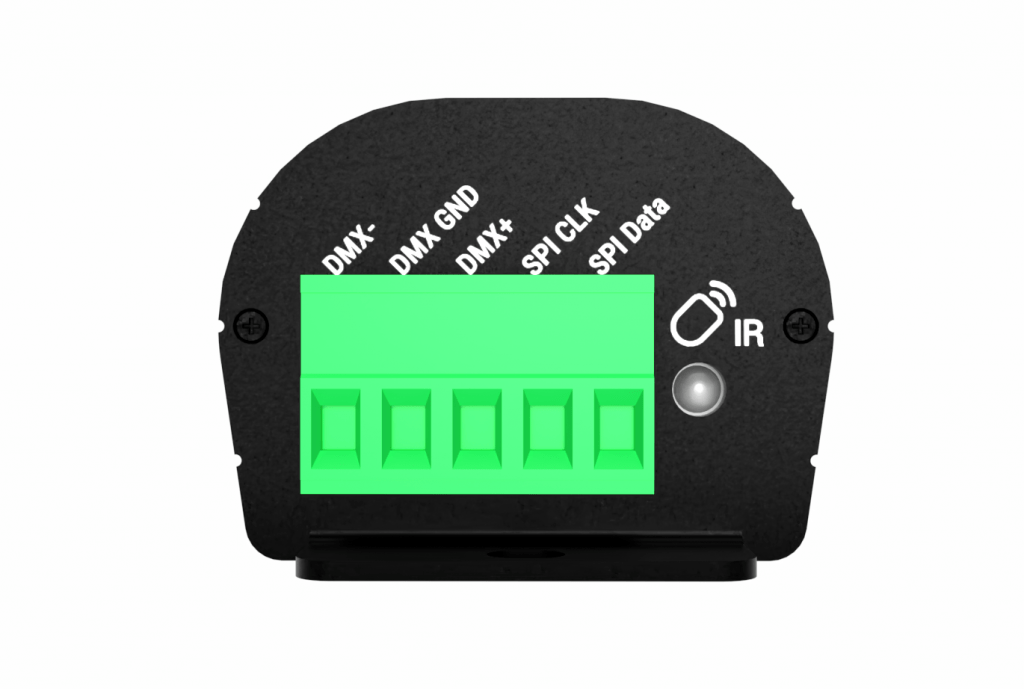
Screw Terminal Block
1. DMX - 
2. DMX Ground
3. DMX +
4. SPI Clock
5. SPI Data

 Infrared Receiver LED

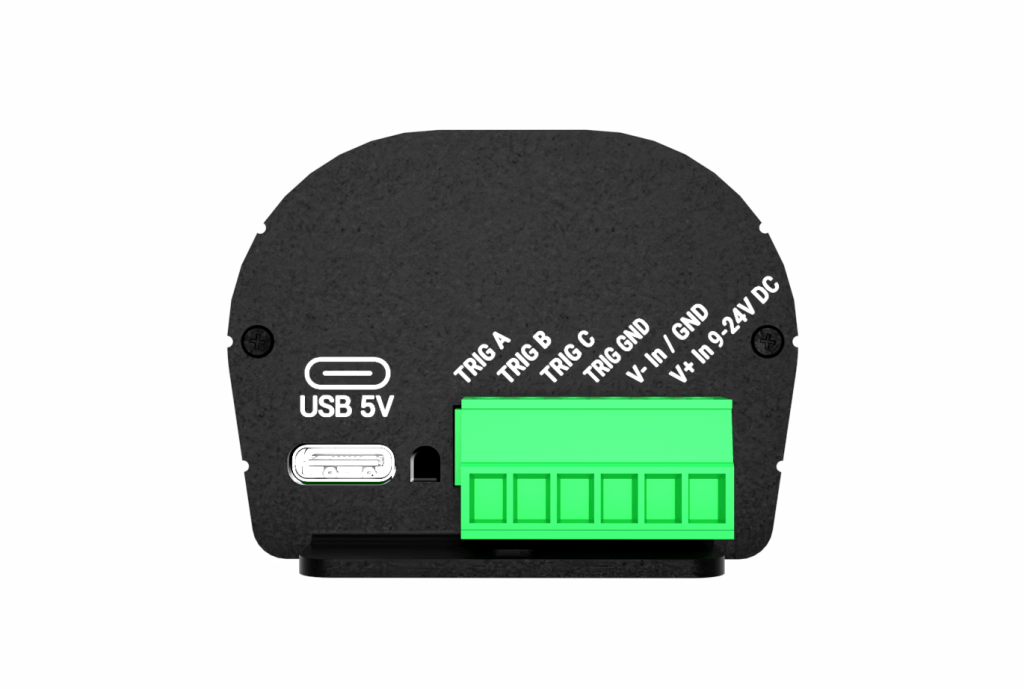
Screw Terminal Block
1. Trigger A
2. Trigger B
3. Trigger C
4. Trigger Ground
5. V- Input / Ground
6. V+ Input / 9-24 V DC

your 360 images

Discover and compare Chromateq devices.

Compatible Software

Lighting control software

Our new DMX controller – CLUB SPI can be integrated into scalable control systems designed for live performance or fixed installation, or deployed individually without a computer as an elegantly simple but sophisticated standalone control solution.

All our Lighting Management Software are Free and require a Chromateq™ Device or Interface to transform your computer into an impressively adaptable and effective DMX Controller.

Infrared Remote

Module Infrared 25
Module Infrared 01
Module Infrared 02
Module Infrared 03
Module Infrared 04
Module Infrared 05
Module Infrared 06
Module Infrared 07
Module Infrared 08
Module Infrared 09
Module Infrared 10
Module Infrared 11
Module Infrared 12
Module Infrared 13
Module Infrared 14
Module Infrared 15
Module Infrared 16
Module Infrared 17
Module Infrared 18
Module Infrared 19
Module Infrared 20
Module Infrared 21
Module Infrared 22
Module Infrared 23
Module Infrared 24

Infrared Remote Unit

Each button play or stop a scene.
Buttons 1 to 15 must be assigned to a scene number via the software before upload your project in memory.

—–
Buttons 1 to 15 are available with single zone project.
Buttons 1 to 9 are available with multiple zone projects.
Select the mode speed, dimmer and use + and – buttons.

Number 2

Each button triggers a different scene. Buttons 1 to 15 must be assigned to a scene via the software.
—–
Trigger 1 to 15 with 1 Zone.
Trigger 1 to 9 with several Zones
Buttons 1 to 15 must be assigned to a scene via the software.

Number 3

Each button triggers a different scene. Buttons 1 to 15 must be assigned to a scene via the software.
—–
Trigger 1 to 15 with 1 Zone.
Trigger 1 to 9 with several Zones
Buttons 1 to 15 must be assigned to a scene via the software.

Number 4

Each button triggers a different scene. Buttons 1 to 15 must be assigned to a scene via the software.
—–
Trigger 1 to 15 with 1 Zone.
Trigger 1 to 9 with several Zones
Buttons 1 to 15 must be assigned to a scene via the software.

Number 5

Each button triggers a different scene. Buttons 1 to 15 must be assigned to a scene via the software.
—–
Trigger 1 to 15 with 1 Zone.
Trigger 1 to 9 with several Zones
Buttons 1 to 15 must be assigned to a scene via the software.

Number 6

Each button triggers a different scene. Buttons 1 to 15 must be assigned to a scene via the software.
—–
Trigger 1 to 15 with 1 Zone.
Trigger 1 to 9 with several Zones
Buttons 1 to 15 must be assigned to a scene via the software.

Number 7

Each button triggers a different scene. Buttons 1 to 15 must be assigned to a scene via the software.
—–
Trigger 1 to 15 with 1 Zone.
Trigger 1 to 9 with several Zones
Buttons 1 to 15 must be assigned to a scene via the software.

Number 8

Each button triggers a different scene. Buttons 1 to 15 must be assigned to a scene via the software.
—–
Trigger 1 to 15 with 1 Zone.
Trigger 1 to 9 with several Zones
Buttons 1 to 15 must be assigned to a scene via the software.

Number 9

Each button triggers a different scene. Buttons 1 to 15 must be assigned to a scene via the software.
—–
Trigger 1 to 15 with 1 Zone.
Trigger 1 to 9 with several Zones
Buttons 1 to 15 must be assigned to a scene via the software.

Zone A | 10

With 2 Zones and +, select a zone to control. 5 Zones available: A, B, C, D, E and Global Zone: [ ] to trigger each Zone together.

Zone B | 11

With 2 Zones and +, select a zone to control. 5 Zones available: A, B, C, D, E and Global Zone: [ ] to trigger each Zone together.

Zone C | 12

With 2 Zones and +, select a zone to control. 5 Zones available: A, B, C, D, E and Global Zone: [ ] to trigger each Zone together.

Zone D | 13

With 2 Zones and +, select a zone to control. 5 Zones available: A, B, C, D, E and Global Zone: [ ] to trigger each Zone together.

Zone E | 14

With 2 Zones and +, select a zone to control. 5 Zones available: A, B, C, D, E and Global Zone: [ ] to trigger each Zone together.

Global | 15

With 2 Zones and +, select a zone to control. 5 Zones available: A, B, C, D, E and Global Zone: [ ] to trigger each Zone together.

Increase | 16

Selects next or previous scenes
—–
Increase or decrease the value of the
selected mode:
– Scene +/-
– Dimmer +/-
– Speed +/-
– Color +/-

Pause | 17

Freezes the current scene in its state

Blackout | 18

Stops the current scene and plays the scene 00. All DMX levels are set to zero.

Decrease | 19

Selects next or previous scenes
—–
Increase or decrease the value of the
selected mode:
– Scene +/-
– Dimmer +/-
– Speed +/-
– Color +/-

Speed Mode | 20

Select Speed mode
—–
Increase Speed value

Dimmer | 21

Select Dimmer mode
—–
Increase Dimmer value

Release color mode | 22

Color Mode | 23

Select Color mode
—–
Decrease Speed value

Scene Mode | 24

Select Scenes mode
—–
Decrease Dimmer value

One IR Remote unit is included in CLUB SPI package.
Main Features

Hardware & DMX (Software & Live)

CLUB SPI

Retail Price (excluding VAT)

€259 / $299

DMX with PRO DMX 2

512 (In/Out) per device

SPI Out (Data + Clock) with PRO DMX 2, PIXXEM

1x 10²⁰ Px. / 3072 Ch. at 15 to 30 fps

DMX to SPI converter (LED Driver)

512 channels, 170 RGB or 128 RGBW pixels, Pixel grouping

RDM (dual DMX data directions, DMX addressing)

Yes

USB-C compliance

Yes (5V. DC, 0.1A)

Upgradable on site

Yes, (Software Art-Net Universe)

Max Device Connected

x1 by USB

International Warranty​

3 Years

Dimensions (mm / in)

H : 103 (4.06 in ) / W : 50mm(1.96in) / D : 37,5mm (1.47in)

Weight / Operating Temperature / Certification

0.1 Kg (0.22 lb) / -40 to +85 C° / CE, RoHS

Stand Alone

DMX Out (16-bit channels) and SPI

512 Ch. DMX in/out and 3072 Ch. SPI out

DMX to SPI LED converter / driver / Encoder

512 Channels, pixel grouping

Zone & Scene

1 (DMX + SPI)

Zone (Scene play a time)

1

Power Input

5V, 0.3A (USB-C) / 9-24V, 0.3A DC (T. Block connector)

Memory (Stand Alone)

Memory Step capacity

Up to 20,000 (32 MB)

Max Scene capacity

512

Triggers (Stand Alone)

Smart dry Contacts (on, on/off, release, commands)

3 pins (Trigger on 5V DC)

Infrared IR remote (play/stop/pause, dimmer, speed)

Yes

DMX in

Yes 512

Software Options

Software

CLUB SPI

PRO DMX 2, STUDIO DMX

512 DMX (In/Out) + 3072 SPI Out per device

Audio Timeline

Optional (need FULL* Upgrade)

WI-LIGHT 2 - Mobile APP / API

Software control only only from a mobile and LAN

Worldwide Technical Support​

Yes, English, French, Chinese​​

*FULL: +RDM + 24hTimeline + Multi timeline + Timeline Live record + 3D unlimited + MIDI Time Clock + SMPTE + PC Calendar & Clock Triggers.

Art-Net, sACN, DVI, DMX in/Out

ART-NET, sACN Output (PRO DMX 2 / PIXXEM)

Optional (max 64U / 512U), need upgrade

DMX Input, control and Record

512

ART-NET, sACN Input, control, triggers, record

Optional (max 16U)

DVI supported resolution (PIXXEM)

Optional (max 1920*1080)

Triggers

MIDI, RS232, Wi-Light 2, UDP, Keyboard, Hyperlinks

Yes

MIDI Control, Audio BEAT, BPM, Wi-Light, UDP

Yes

User Interface customization

Yes

Support and Download

Datasheet - Product Manual

CLUB SPI’s complete technical documentation (Data-sheet)

Product Brochure

CLUB SPI‘s description, main features and specifications

Quick Start Guide

Quick explanation of the CLUB’s features. Quick start guide with mounting, safety instructions and pinout.
Available languages: en, fr, cn

Product Pictures & Videos

High-resolution CLUB SPI Chromateq product images and videos for commercial use, promotion and marketing

Device Comparison Chart

Table comparing Chromateq interface features by model

Software Downloads

Windows, Mac OS, Linux, and Raspberry versions and additional support (Fixture Profiles, drivers)

Documentation

All available commercial files (Brochure, Flyer, Certificate of conformity, poster, wiring schematic by Language EN, FR, CN)

Device Data-Sheet

All interface datasheets and complete technical documentation by language (EN,FR, CN)